<%= message %>
// ejshtml.js var express = require('express'); var ejs = require('ejs'); var app = express(); app.engine('html', ejs.__express); app.set('view engine', 'html'); app.set('views', __dirname) app.use('/ejshtml', function(req, res) { res.render('ejshtml.html', {message : 'hello'}) }) app.listen(3000) ``` ###### 2\. atrtemplate结合express ```js // arttemplate.html<%= message %>
//artemplate.js var express = require('./lib/express'); var app = express(); var template = require('art-template'); template.config('base', ''); template.config('extname', '.html'); app.engine('.html', template.__express); app.set('view engine', 'html'); app.use('/arttemplate', function(req, res) { res.render('arttemplate.html', {message : 'hello'}) }) app.listen(3000) ``` ###### 3\. underscore.js ``` // underscore.js 'use strict'; var underscore = require('underscore'); var compiled = underscore.template("hello <%= name %>"); console.log(compiled({name:'mike'})) ``` ###### 分析 可以注意到一件事,本质上模板引擎其实跟html关系不大,只是对字符串的分析 不过据说pug(前身jade)内含大量针对html优化的部分 重点来看一下ejs结合express的渲染流程 ejs 拥有以下标签 ``` <% %>流程控制标签 <%= %>输出内容标签(原文输出HTML标签) <%- %>输出标签(HTML会被浏览器解析) <%# %>注释标签 % 对标记进行转义 <%- include(path) %> 引入 path 代表你引入其他模板的路径 ``` 参考上述的例子看一下`<%= %>`标签 整个ejshtml.html被处理,实际上是被`有限自动机`切割成几个token  如果对html部分做解析,那就需要更小的token颗粒 ###### 代码分析 对[express 4.15.5版本](https://github.com/expressjs/express/tree/ea3d60565242c47be97088ead2708d7b88390858?ref=blog.hacking.pub)做代码分析 ``` if (!opts.engines[this.ext]) { // load engine var mod = this.ext.substr(1) debug('require "%s"', mod) opts.engines[this.ext] = require(mod).__express } // store loaded engine this.engine = opts.engines[this.ext]; ``` 这里面的\_\_express就是外面ejshtml.js中利用app.use传入的 \_\_express对传入的数据处理代码调用栈如下 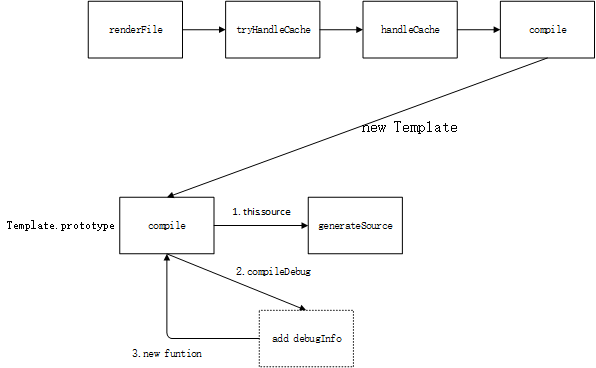 最终核心逻辑在Template.compile 其中[509行](https://github.com/mde/ejs/blob/master/lib/ejs.js?ref=blog.hacking.pub#L509)查看 注意ejs有两个项目,一个是tj的,一个是mde的;现在项目是由mde维护的 this.source 和 src 变量 ``` this.source : "" || || this.generateSource \/ this.source: " ; __append("\r\n") ; __line = 4 ; __append(escapeFn( message )) ; __append("
\r\n \r\n") ; __line = 6 " || || ejs.js line 510 ~ 519 \/ this.source: " var __output = [], __append = __output.push.bind(__output); with (locals || {}) { ; __append("\r\n") ; __line = 4 ; __append(escapeFn( message )) ; __append("
\r\n \r\n") ; __line = 6 } return __output.join(""); " || || compileDebug == true \/ local src : "var __line = 1 , __lines = "\r\n<%= message %>
\r\n \r\n" , __filename = "c:\\Users\\chainhelen\\Desktop\\what you want\\express\\ejshtml.html"; try { var __output = [], __append = __output.push.bind(__output); with (locals || {}) { ; __append("\r\n") ; __line = 4 ; __append(escapeFn( message )) ; __append("
\r\n \r\n") ; __line = 6 } return __output.join(""); } catch (e) { rethrow(e, __lines, __filename, __line, escapeFn); } " || || skip opts.client code \/ || || fn = new Function(opts.localsName + ', escapeFn, include, rethrow', src); \/ fn: "function anonymous(locals, escapeFn, include, rethrow /*``*/) { var __line = 1 , __lines = "\r\n<%= message %>
\r\n \r\n" , __filename = "c:\\Users\\chainhelen\\Desktop\\what you want\\express\\ejshtml.html"; try { var __output = [], __append = __output.push.bind(__output); with (locals || {}) { ; __append("\r\n") ; __line = 4 ; __append(escapeFn( message )) ; __append("
\r\n \r\n") ; __line = 6 } return __output.join(""); } catch (e) { rethrow(e, __lines, __filename, __line, escapeFn); } }" ``` 可以看见,实际上原始数据`{message: hello}`是通过`Fn`执行,变量`locals`带入的 escapeFn 是将数据进行html转码 整体逻辑需要理清楚的两个步骤 this.generateSource ###### genrateSource 在ejs.js[第597行](https://github.com/mde/ejs/blob/master/lib/ejs.js?ref=blog.hacking.pub#L597) ``` // Slurp spaces and tabs before <%_ and after _%> this.templateText = this.templateText.replace(/[ \t]*<%_/gm, '<%_').replace(/_%>[ \t]*/gm, '_%>'); ``` 先尝试把类特定token的部分前后空白去除掉 在ejs.js[第598行](https://github.com/mde/ejs/blob/master/lib/ejs.js?ref=blog.hacking.pub#L598) ``` var matches = this.parseTemplateText(); ``` 主要看就看`parseTemplateText()函数` ``` parseTemplateText: function () { var str = this.templateText; var pat = this.regex; var result = pat.exec(str); var arr = []; var firstPos; while (result) { firstPos = result.index; if (firstPos !== 0) { arr.push(str.substring(0, firstPos)); str = str.slice(firstPos); } arr.push(result[0]); str = str.slice(result[0].length); result = pat.exec(str); } if (str) { arr.push(str); } return arr; }, ``` 这个函数会把原始数据进行拆分成上图一效果,数组arr都是token字符串 > 这里有个可能可以优化的点 => 正则 参考[vary 提速](https://github.com/jshttp/vary/commit/71999e4e951b1edda345dc86641d0487d4e73305?ref=blog.hacking.pub) 紧接着ejs[605行](https://github.com/mde/ejs/blob/master/lib/ejs.js?ref=blog.hacking.pub#L605)进入不断循环状态机,对于不同状态的不同处理在ejs[652行](https://github.com/mde/ejs/blob/master/lib/ejs.js?ref=blog.hacking.pub#L652),函数`scanLine` 对于model来说,状态如下 ``` Template.modes = { EVAL: 'eval', ESCAPED: 'escaped', RAW: 'raw', COMMENT: 'comment', LITERAL: 'literal' }; 其实还有null这一其实状态 ``` 比方说,扫描到了`<%`,那么就进入Template.modes.ESCAPED状态,随后的匹配token分为两种 1. token不是结束符`%>、_%>、-%>`等,那么就按ESCAPED状态处理,即ejs[763行](https://github.com/mde/ejs/blob/master/lib/ejs.js?ref=blog.hacking.pub#L763) 2. token是结束符,那么成为起始状态null,即ejs[753行](https://github.com/mde/ejs/blob/master/lib/ejs.js?ref=blog.hacking.pub#L753)